Build Your Own Project Using Our Age Detection Technology
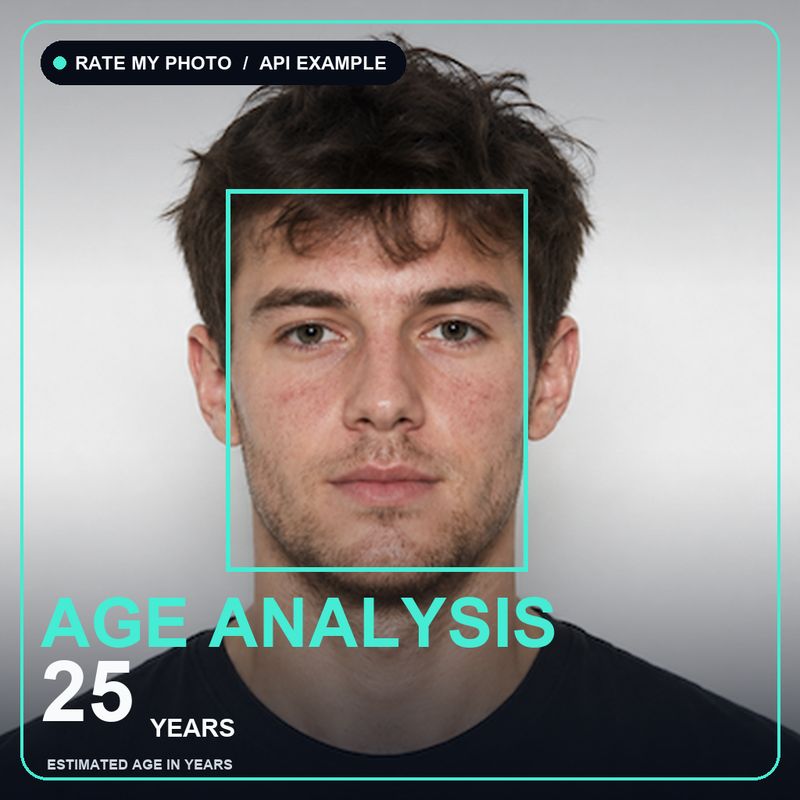
An age estimate can be more than a number on a results page. It can become part of a photo experiment, a creative app, a research prototype, or an interactive installation.
Our age detection API lets a project send one image and receive structured JSON about the primary face found in that image. The standard response contains an apparent-age estimate and a boundary box. You can also request a cropped face or combine the estimate with face-mesh data.
The important phrase is apparent age. The API estimates how old a person looks in a particular photo. It does not know the person's birthday, confirm their identity, or prove that they are above or below a legal age. Lighting, camera angle, expression, image quality, styling, and normal differences between people can all affect the result.
Project ideas you could build
A “How old do I look?” feature
Add an optional photo experience to a website, mobile app, event screen, or community project. A user supplies a photo and your interface displays the estimate in a friendly way.
The returned age is a decimal number, such as 25.42. You might show it as “about 25” rather than implying that the decimal is an exact measurement.
A private photo comparison journal
Let people compare their own photos from different days, styles, or settings. They could explore questions such as:
- Does this hairstyle make me look younger or older?
- How much does lighting change the estimate?
- Does the same photo give a similar result after it is cropped?
This works best as a playful comparison tool. A difference between two results does not prove that someone has physically aged or become healthier.
A camera-framing helper
The default age response includes a boundary_box. It describes a rectangle around the detected face. You can use this data to draw an outline, create a preview crop, or check whether the primary face is positioned where your interface expects it.
The box is not a quality score. A box can tell you where the face is, but it does not say that the image is attractive, suitable for identification, or guaranteed to produce a reliable age estimate.
A face-based creative effect
If your idea needs more than age, the API can optionally return a face mesh with 478 three-dimensional landmarks. These points can support experiments such as masks, overlays, simple avatar controls, or face-aligned graphics. Optional pose values can describe head orientation.
Start with the age response if that is all your product needs. Face-mesh responses are much larger, so requesting extra data without using it only adds work to your application.
An opt-in research or classroom prototype
Students, designers, and researchers can use the response to explore how computer vision behaves under different conditions. For example, a project could compare results across lighting, camera distance, or facial expression.
Keep the scope modest. A small experiment cannot establish that the model performs equally for every group or situation. Use photos with permission, test across varied participants and image conditions, and explain the limitations wherever results are shown.
The most useful part: the JSON response
Here is a typical response from the age endpoint:
{
  "api_version": "1.1",
  "age": 25.42,
  "boundary_box": {
    "x": 113,
    "y": 89,
    "width": 142,
    "height": 180
  }
}
You can read it in plain language like this:
api_versiontells your project which response format it received. Keeping this value makes future changes easier to manage.ageis the estimated apparent age of the primary detected face. It is a number, not a verified date of birth.boundary_boxtells you where that face appears in the original image, measured in pixels.xandyare the left and top positions of the box.widthandheightare the size of the box.
For the example above, an interface could round 25.42 and display “Estimated apparent age: 25.” It could also draw a rectangle beginning 113 pixels from the left and 89 pixels from the top.
Minimal code: use the result, do not overwork the request
Your server can make the API request and turn the response into a JSON object with a small amount of code:
const response = await fetch("https://api.rate-my-photo.com/age", {
  method: "POST",
  headers: {
    "Authorization": "Bearer YOUR_TOKEN",
    "Content-Type": "application/json",
    "X-API-Version": "1.1"
  },
  body: JSON.stringify({
    face_image_url: "https://example.com/portrait.jpg"
  })
});

const result = await response.json();

if (result.error) {
  showMessage(result.error.message);
} else {
  showAge(`About ${Math.round(result.age)}`);
  drawFaceBox(result.boundary_box);
}
This example intentionally keeps the request short and concentrates on the response. showAge, drawFaceBox, and showMessage are simple functions you would connect to your own interface.
Keep production credentials on your server, not in browser or mobile-app code that people can inspect. For the request format, available options, image limits, and current API version, use the API documentation.
Optional response data
The basic response is enough for many projects. When you need more, the age endpoint can optionally include:
face_base64: a base64-encoded crop of the detected face.facemesh: face-mesh data requested as part of the same age analysis.facemesh.keypoints: 478 normalized points, each withx,y, andzvalues.facemesh.frontalized_keypoints: optional pose-corrected points.facemesh.pose: optional head-orientation measurements such as yaw, pitch, and roll.
A combined response may look like this:
{
  "api_version": "1.1",
  "age": 25.42,
  "boundary_box": {
    "x": 113,
    "y": 89,
    "width": 142,
    "height": 180
  },
  "facemesh": {
    "keypoints": [
      { "x": 0.47999, "y": 0.58708, "z": -0.04268 }
    ],
    "pose": {
      "yaw": 1.2,
      "pitch": -2.4,
      "roll": 0.8
    }
  }
}
The keypoints array is shortened here to keep the example readable. A full response contains 478 points.
Errors are also useful JSON
Real projects need a calm path for photos that cannot be analyzed. If no usable face is found, the API returns a structured error instead of an invented age:
{
  "api_version": "1.1",
  "error": {
    "code": "NO_FACE_DETECTED",
    "message": "No face was detected in the supplied image."
  }
}
Your interface can use the stable code for its logic and show the message, or your own friendly wording, to the user. Other errors can describe an invalid image, an image that is too large, a URL that cannot be reached, or a temporary service problem.
Do not treat every error as the user's fault. A helpful product might say, “We could not find a clear face. Try a front-facing photo with better lighting,” while also offering a retry button.
Build with sensible limits
Before releasing a project, decide what the estimate will and will not be used for.
- Describe the result as an estimate of apparent age.
- Do not use it as proof of legal age, identity, health, or eligibility.
- Ask permission before analyzing someone's face.
- Collect and store only the data your project needs.
- Avoid saving uploaded images or face crops by default.
- Test with different faces, lighting conditions, cameras, expressions, and poses.
- Provide another path when the model is uncertain or a face is not detected.
- Let people correct, dismiss, or remove a result where appropriate.
These choices are part of the product, not just technical details. Clear wording and respectful handling of photos will make your project easier to understand and safer to use.
Start with one small idea
The easiest first version is usually the best one: send a permitted photo, read age, display a rounded estimate, and handle the error response. Add the boundary box, face crop, or face mesh only when your idea has a clear use for it.
Explore the available outputs on the age and face analysis API page, then check the technical documentation when you are ready to connect a prototype. For production access and current pricing, contact us with a short description of what you want to build.
Try age detection on your photo
Upload a face photo to get a live age estimate from our API in seconds. Your photo is sent securely to the API only to run this analysis.
See the API request behind this result
Tips for the best results
- Keep the face roughly upright — within 45° up and 30° down.
- Limit head turn (yaw) to under 45° in either direction.
- Both eyes should be open and clearly visible.
- Leave a little room around the face — avoid tight crops.
- Remove anything covering the face, like masks or headbands.
- Use even, flat lighting with no harsh shadows.
Find Out How Old You Look
Try our AI-powered age detection tool - it's quick, accurate, and completely free!
Try Age Detection Now